Maine Bridge Club
Release 2.19r
Bulletin

2025 Ron Wescott Club Championship Pairs - Overall Results 

We have our 2025 Club Champion Pair.  Well done, Louise & Jo! (Assisted by Sub Peter.).See the Overall results for details. Please note that Red masterpoint awards are provisional until approved by the State Masterpoint Secretary. 

2025 Maine Macedon Cup - Team Maine Retain the Trophy!

Saturday 30th August. Well done, team, it was an emphatic win! Maine teams scooped all of the top 4 places.

Overall winners were...

  1. Pritchard / Reynolds / O'Hare / McGregor  +109 IMPs
  2. Banko / Ranson / Dyson / Wiltshire +104 IMPs
  3. Ride / Griffin / Williams / Bessell +84 IMPs
  4. Goddard / Godddard / Moore / Hegarty +48 IMPs

Best performed Macedon Ranges team were Poletti / Crozier / Crozier / Legge, with +33 IMPs.

See the Results calendar for details of the Morning and Afternoon sessions, and the Overall results.

Overall Results have been updated. Click on the Information tab for details.

Many thank-yous are owed. Firstly, to our opponents, Macedon Ranges. With a large number of newbie players in their team, they were gracious in defeat and modelled the friendly demeanor that both clubs want to promote in this fixture.

Then to our Director, Kerrie, who mastered the unusual movement, and the people wrangling that goes along with that, with aplomb. 

Next, to the two team managers: Louise (Maine) and Cate (Macedon): it takes a lot of co-operative liaison and behind the scenes organisation to get an event like this up and running smoothly.

...and many more. 

New link to MyABF website

A link to the MyABF website has been added to our 'Useful Links' page. Members who have not yet signed up to  MyABF are encouraged to do so, as it gives you a personal ABF account you can login to. The ABF are actively expanding the functionality of MyABF and, over time, it  will come to play a significant role in supporting your bridge activities. (Eg, Entry and fee payment for the recent Geelong BC Congress was via MyABF.)

2025 Club Winter Pairs - Overall Results

Congratulations to Graeme & Aidan as overall winners of the event. Check out the rankings (attached to Calendar entry for June 17th) for details and to see if your partnership has been awarded any bonus Overall red points. (Note that red point allocations are provisional until approved by the ABF.)

Recent Updates
Home Page
8th Jan 2026 22:25 EADT
Bulletin
5th Dec 2025 17:29 EADT
Useful Links
18th Nov 2025 22:16 EADT
0 0 0 0 0 0
Pages viewed in 2026
Member Only Area

How to Get Here

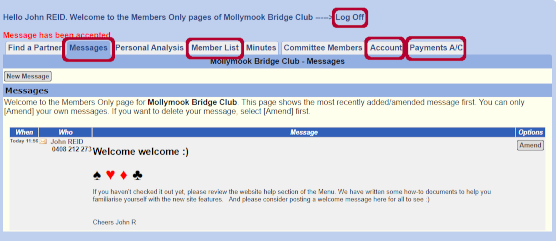
  • From the Home Page, click on the Members Only button on the top right; or
  • From the Home Page, click on Member Area in the menu.

Things to Do Here

Update Your Profile

  • Click on the Account tab 
  • Note that greyed out areas may not be edited.  Please contact Graham Forbes if you want to change any greyed out data
  • Please review and if necessary update your contact information (email and phone no) and address
  • It would be very useful to have emergency contact information for all club members, please consider updating the emergency contact name and phone number.
  • Upload a photo of yourself :)
  • There are a number of Yes/No options towards the bottom of the page.  These relate to privacy settings:
  1. Opt into List Yes/No (Do you want your name to appear on the Members List - available to Members Only)
  2. Next 3 questions: Opt in to show mobile/phone/email. Are you happy for some or all of these to be on the Members List - available to Members Only.
  3. The last 3 are more important as they relate to the 'Find a Partner' Feature.
  4. Select which, if any you want to appear on the Calendar (Public) when you select 'Find a Partner' (Phone/ Mobile/Email). You can still use the feature if you say 'No' to each. It just means that another member will need to look up your details, in the Members List to contact you. Maybe consider just your Mobile here?
  5. Remember, your 'Find a Partner' detail is only visible until you get a partner and remove it.
  • IMPORTANT: After making any changes, you must scroll back to the top and click 'SAVE', otherwise you will lose all your changes.

Check the Club Message Board

  • Click on the Messages tab
  • This area will display any public messages posted by other members, and any public or private (reminder) messages which you have posted.  

Get Member Information

  • Click on the Member List
  • A list of all Maine BC members and their contact details will be presented
  • You can quickly search for a specific member by typing their surname in the Search box.

Find a Partner

  • This functionality is described in the Find a Partner article: Website Help -> Finding a Partner.

Log Off

  • For most members of the club there should be no need to Log Off; but if you wish to, click on the Log Off text at the top of the page.