This is a Step-by-Step on how to Set up your Login for your Bridge Club Members Area and to give you access to the Members Area.
Step 1
Click on the Members Area in the menu on the left or a Members Only Link on the website.
You will see a box as outlined in (Diagram 1).
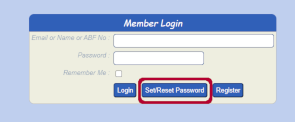
Diagram 1
If you have never logged in before and don't have a password yet Click Set/Reset Password. DO NOT FILL ANYTHING IN HERE.
Then you will see the following box (Diagram 2).

Diagram 2
Step 2
Now enter the same email that the Bridge Club has for you and Click 'Send Set Password Email'
You should now see a box that says this (Diagram 3). It should say Email sent.

Diagram 3
Step 3
Now go to your email (it may take a couple of minutes but if you have nothing, start looking in your junk/spam mail - if you do find it in junk or spam, you need to make the sender a safe sender or accept mail from this sender)
You should get an email which says this which has a link in the email:
Set/Reset your Bridgewebs Member password
Hello
Bridgewebs has received a request on the "Strathfield Bridge Club" web site to set or reset your password
To reset the password, click the link below
Set/Reset your password here
Step 4
Once you click on the link in your email you will be taken to a box that looks like Diagram 4
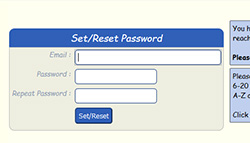
Diagram 4
Step 5
Now make a note of your Bridge Club Login Details (otherwise if you forget it you will need to reset it).
Troubleshooting:
Common Problems are:
1. Members are using a different email to what the Bridge Club has - remember your name and email has to line up with what is in the database. If you continue to have problems you may need to check with the Secretary or Treasurer.
2. The email ends up in the email junk folder (this may be a problem with people using Hotmail, Yahoo and maybe Gmail Accounts). As the emails are coming from a website some email programs may filter them as spam/junk. If this happens you need to add the sender to your 'safe senders' list.
|