Booking a Session
Method 1 (easiest)
1. Login to the Member Area
2. Click on the 'Find a Partner' Tab (but it probably opens there anyway)
3. Find the Session you want to Book For and place a Tick in the PL (Playing) Box
4. Now type your partners name and select Any, N/S, E/W (if you have a preferred direction.
5. Finally and most importantly, scroll up and click 'Confirm'
Also the Member who makes the Booking should Cancel the Booking if required.
Same process just 'Untick' the Box and Confirm.
Method 2 (Directly from the Calendar without Logging In
1. On the 'Home' page of the Website select 'Calendar Month' from the Menu.
2. The Calendar will open on the current month (to go forwards or backwards in months) use the arrows at the top of the calendar.
3. Select the date you want to Book and hover over the date (may vary on devices - if using phone or tablet you may need to click the date to see the popup) and you will see this 'Popup':
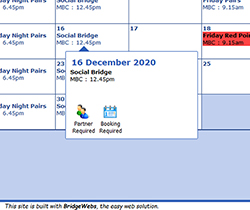
4. Click on 'Booking Required' (or Find a Partner if appropriate)
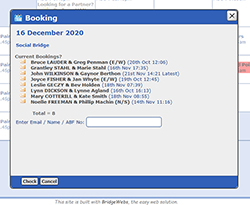
5. Type in your Name and click 'Check' it will look for you in the Members List.
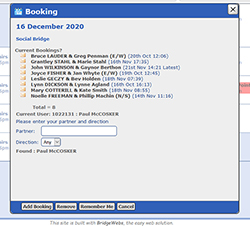
6. It will then ask your Partners Name and if you have a preference for direction.
7. Complete the details and then click 'Add Booking'
Remove a Booking
Also if your circumstances change you can Remove your Booking and let others Book.
The is common courtesy so please do so as soon as you know your circumstances.
1. To remove a Booking you go through the same proces.
2. Go to the day in the 'Calendar Month' and again select 'Booking Required'.
3, Enter your Name and click 'Check'
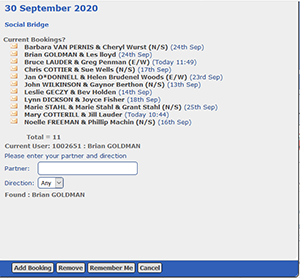
4. The website will recognise that you are already Booked and give you the opportunity to 'Remove' the booking.
(Second button from the left at the bottom)
Same applies to 'Find a Partner' when you want to remove the listing.
See diagram above.
You must remove a Find a Partner Request before it will allow you to Book.
|