|
RealBridge can be played on most PC’s, smart phones or iPads with up-to-date software. If you are playing on an Apple MacBook or iMacdevice use Google Chrome or Firefox as your browser rather than Safari. (On iPad there is no choice - only Safari)
RealBridge does not require a webcam to run - you can play without video or audio although this will offer a diminished playing experience.
TESTING YOUR CAMERA/AUDIO
This can be done in advance by clicking on the following link. Everyone should do this before laying Realbridge for the first time! Ensure you are signed out of sites (such as Zoom) that access your camera https://play.realbridge.online/camera.html
JOINING THE GAME
A session link will be emailed/posted on the organising club’s website. Click/tap on the link 15 mins prior to the game and you will be taken to a login page. Here you can test your video/audio function before logging into the game if you have not done so already.
When you are ready to join the session enter your FULL name and WBU number as your ID number.
Click/tap LOGIN. This will take you to a Lobby, where you will be able to see a list of other players either also in the lobby or seated at a Table. Look at the tables to see if your partner has already arrived and join them by clicking on the opposite seat.
If they have not arrived, find empty seats (E/W or N/S) click on one and wait for your partner to join you.
PLAY
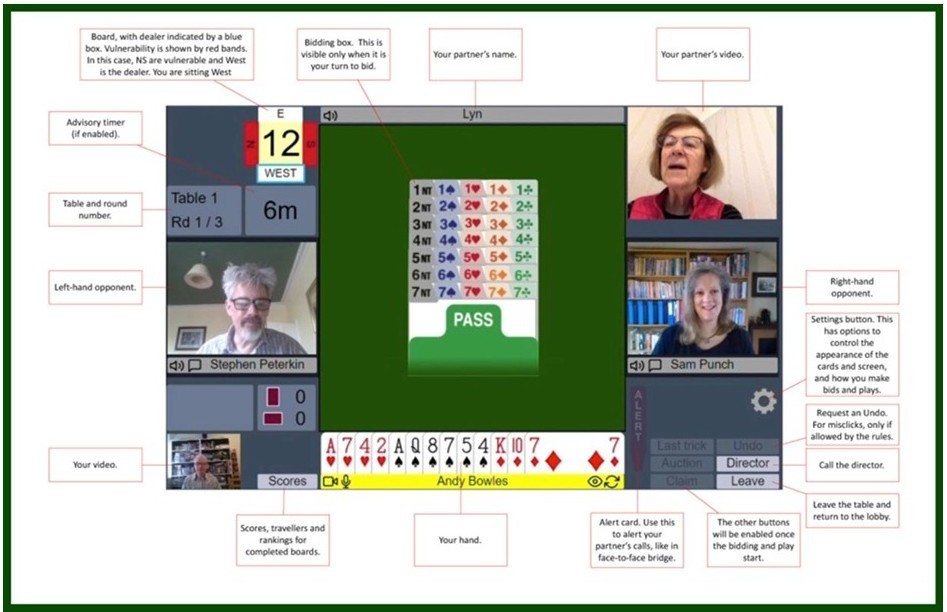
Rather than self-alerting, players will be alerting and announcing their partner’s calls, speaking to announce, clicking the ‘Alert’ button to alert.
As there are no robots, if there are an odd number of pairs the movement may require a sit out.
Once seated you can see and talk to other members at that table or chat by text if you have no microphone. If unsure about anything a tab can be clicked to call the Director. We will appear in the top left corner of your screen.
Detailed playing instructions can be viewed on the RealBridge website https://realbridge.club/player-guide.html
ENDING THE SESSION
At end of the session you can remain at the table for as long as you wish to review scores and/or chat to your final opponents.
To remove yourself from the platform click ‘leave’ to return to the lobby then close the browser window (there is no logout as such).
TROUBLE SHOOTING
If you have a technical problem such as the screen freezes or audio/video signals deteriorate, try the following in order:
• Click the circular symbol to the far right of your name (refresh button).
• Leave the Table, then re-join it.
• Refresh your browser (circular symbol at top of screen or F5 on keypad)
• Close the browser window, then click on link to login again.
Learn how the fix common issues with camera/microphone HERE
|