1) Preparation for playing on RealBridge
In advance of your Practice Sessions on RealBridge (see Calendar month on the main menu), you will need to test your camera and microphone here.
If your camera and microphone fail the tests then please contact RealBridge direct on support@realbridge.online - please have information ready about your computer i.e. PC, Mac, iPad, Android tablet, etc and your browser e.g. Chrome, Edge, Safari, Opera, etc.
Important: This is a list of computers and browsers which can be used on RealBridge.
There are some constraints on the type of device you can use to access RealBridge:
|
Can Use
|
Can’t use
|
- Windows laptop
- Windows tablet
- Windows desktop
- MacBook or other Apple laptop
- iPad (from 2015 or newer)
- iMac or other Apple desktop
- Chromebook
- Android tablet (eg Galaxy)
|
- Old iPads, older than 2015.
|
Please do not leave the testing of your device until the last minute, do the test as soon as you have attained your 2 MiniBridge Certificates.
2) Getting familiar with the RealBridge playing area
This is a screenshot of the playing area - it would be helpful if before joining your first RealBridge session you could make yourself familiar with it.....
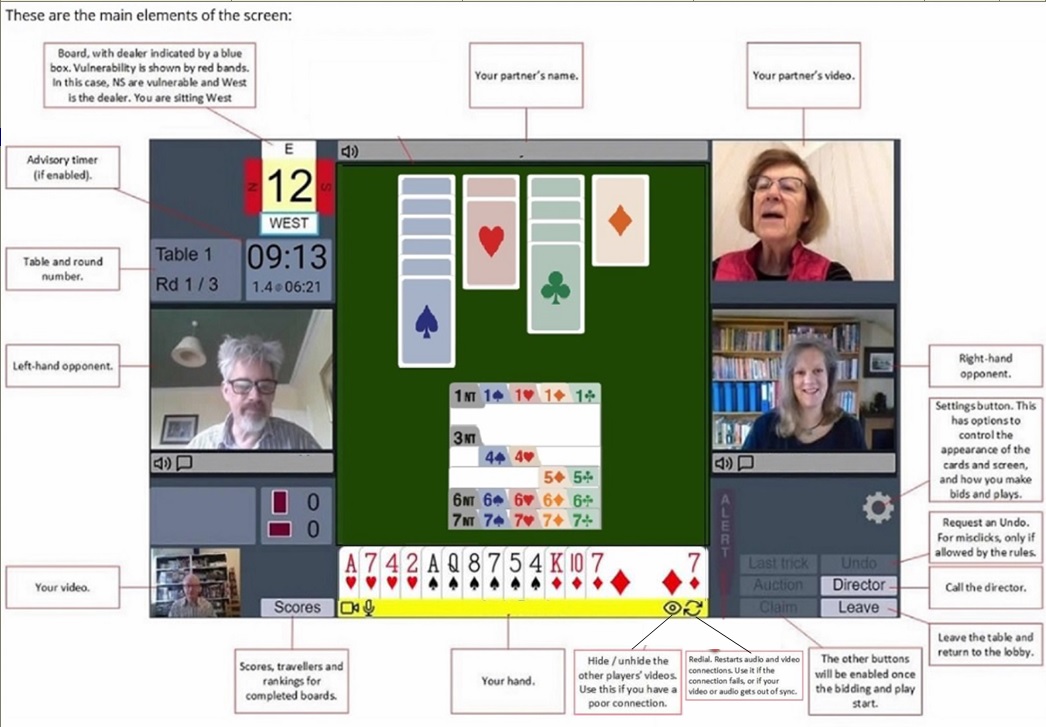
Pdf version of above
|