| Vale John Scrivener |
John passed away in Bega hospital on 15th October after a short illness with pneumonia.
John achieved much in his 95 years, including more than 19 years as a member of our club. He will be well remembered for his ready engagement and ever-ready good humour.
|
|
| Last updated : 15th Oct 2026 13:24 EADT |
|
|
|
|
|
| Calendar by Month |
Click here for the calendar by month in table form
|
|
| Last updated : 8th Aug 2026 09:06 ESTA |
|
|
|
| 2026 Club Calendar and Away Events |
It's time to note these dates in your diary:
Click Calendar for our detailed month-by-month calendar.
Upcoming Major Events:
02 - 05 October Canberra in Bloom
28 October Aust-wide Restricted Pairs (<300 MPs)
31 October - 01 November Cooma Congress
Fridays 6 & 13 November Club Teams Championship
13 - 24 January 2027 Summer Festival of Bridge
|
|
| Last updated : 27th Sep 2026 20:59 ESTA |
|
|
|
|
|
| Where and When |
Our premises are at Shop 9, 13 Tura Beach Drive, Tura Beach.
See our Calendar for session details.
For more information regarding bridge sessions, contact:
Margaret Gaunson 0438 828 669 email: abgmob@hotmail.com
|
|
|
| Last updated : 26th Sep 2024 11:19 ESTA |
|
|
|
| Thank You U3A |
A big Thank You to U3A for your support in promoting bridge within our local community.
♥ We appreciate your support of our Sapphire Coast Bridge Club ♥
|
|
| Last updated : 26th Sep 2024 11:19 ESTA |
|
|
|
|
|
| 🤗 Your Feedback and Comments are Welcome! 😠 |
An extra line with icons is presented under each "News" item and any member can click on one of these icons to view previous comments. To leave a comment or reply to other comments made, you must log in. If you try to add a comment, a log-in pop-up box will get you started. It is fairly self-explanatory and works in a similar fashion to "Social Media" sites.
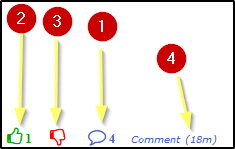
- Click on the "Comment" Icon to open the Comment dialogue. The total number of comments will show
- Click on the "Like" Icon to open the Comment dialogue and make a comment marked as "Like". The number of "Like" comments will show
- Click on the "Dislike" Icon to open the Comment dialogue and make a comment marked as "Dislike". The number of "Dislike" comments will show
- Will show the time since or date of the last comment
Clicking on a Comment Icon will open up the Comment Dialog and you will be able to see previously entered comments
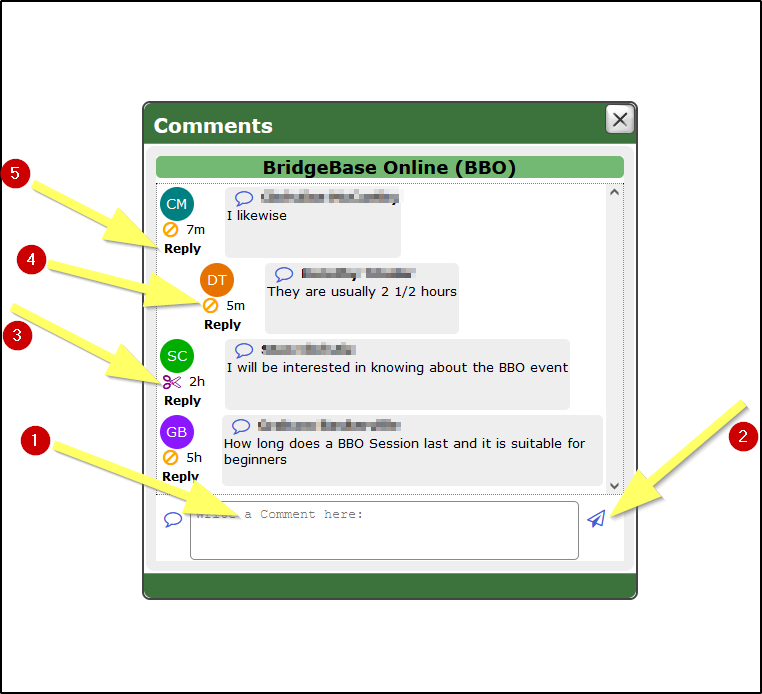
If you are not logged in to the "Members Only" you will first see a Button to Login, proceed as for logging into the "Members Only"
- Enter you comment
- Click on the Send Icon to record the comment
The comment will be logged and the Popup Window closed
Subsequently, click on a Comment Icon again.
A "Scissors" icon will allow a member to delete their own previously entered comment.
..... see less
An extra line with icons is presented under each "News" item and any member can click on one of these icons to view previous comments. To leave a comment or reply to other comments made, you must log in. If you try to add a comment, a log-in pop-up box will get you started. ..........
..... see more |
|
| Last updated : 1st Oct 2022 21:03 EADT |
|
|
|
|
|