Release 2.19r
What's On

Railway Union Bridge Club Newsletter Winter 2025           


RUBC Members' Christmas Party - Monday 15 December

Our Christmas Party will take place on Monday 15th December. Starting with a short game of bridge, we will then repair to the bar for festivities. There will be a spare partner, so please come along even if you haven't arranged a partner for the evening.


Christmas Break

Monday evening bridge will finish up with the Christmas party on 15 December and will resume on Monday 5th January

Thursday morning bridge will finish up on Thursday 18th December and will resume on Thursday 8th January.


Monday Evening Bridge

Monday evening pairs bridge takes place every week (other than on bank holidays). Please be seated by 7.15 p.m. sharp, payment is by card. 


Thursday Morning Bridge

Thursday Morning Bridge usually takes place every week from October through May. Play starts at 10.00 a.m. sharp. Please be seated by 9.45 a.m. Payment is by card.


Need to find a partner?

Use the 'RUBC Social' WhatsApp group or ask any committee member for suggestions.


Any questions: Email railwayunionbridge@gmail.com or ask any committee member on Mondays or Thursdays


Results
Monday Pairs and Christmas Party
Thursday Morning Bridge
Monday Pairs
Thursday Morning
Calendar
18th Dec 2025
Thursday Morning Bridge
Please be seated by 9.45 a.m.
22nd Dec 2025
No Bridge Christmas Break
25th Dec 2025
No Bridge Christmas Break
News 2021/2022
Realbridge Social Bridge Lounge

We used RealBridge as an alternative to BBO during lockdown but it is not active at present (November 2022).


LINK TO PLAY CLICK HERE


Railway Teams competition second session Monday 18th January 2022, click on link below to play.

LINK TO PLAY TEAMS SESSION 2

Railway Teams competition will be on Realbridge over 2 seeions on Monday 11th and Monday 18th January 2022. Cllick below for link to play.

LINK FOR RAILWAY TEAMS session 1 realbridge results

Realbridge Short Practice Tournament Thursday 6th January 2022 5pm (approx 1 hour)

LINK FOR THURSDAY SHORT PRACTICE TOURNAMENT Results


***Very Important*** if you use an ipad or apple computer to play and you have recently upgraded to IOS 15 on your ipad or updated to apple's latest software Monteray on your computer you will need to change some of the settings on your ipad/computer all the instructions on what to do are here 

IPAD settings for Realbridge  

Mac computer settings Realbridge

If you have not played on realbridge before it is a good idea to read the player guide and check your camera beforehand.

Realbridge Player Guide

camera test


Railway Union's Realbridge Social Lounge- Free to play!


Realbridge Lounge will be open Saturday 26th March 2022, enjoy!

LINK TO PLAY CLICK HERE

Chat and play with your Railway friends at our Realbridge Social Lounge which will be available on request on Fridays/Saturdays.The club is sponsoring it, so it will be free to play.

See and chat to your friends while you play just like when you play "house bridge". There will be no score comparisons with other tables or results, it is purely for practice and social play.

How to play?

1.Find 4 people who would like to play a few hands of bridge and arrange to play at a time that suits you.

2. Contact Fiona 0857575636 to ask her to set up a table, she will email you the link to play and it will also be posted here.

3. Log in by clicking on the link fo play. Fill in your real name, no id number is needed and the password will already be filled in, then click log in. Thats all there is to it!

4.After you have logged in you will see your name in the lobby area, you then choose a table and click sit N/S or E/W and your friends can join you there.

Choose a table where the boards haven't been played yet, it will say R1 in the middle of the table when all 20 boards have been played. 

5.When you have finished playing click leave and it will bring you back to lobby but to log off completely you need to close the realbridge tab in your browser.


Only thing left is to enjoy and have fun catching up!

STEP 1: BECOME A BBO MEMBER

We used BBO extensively during lockdown but we are not currently using it (November 2022).


Google www.bridgebase.com or download bridgebase app to your ipad/iphone. 

Click on "Play bridge now"


Click 'Become a member (free!)"


Choose a User name that will be recognised by those who already know you e.g. "Fiona O", "Kieran c". 
 

Choose a Password, enter your email address and your Real name.


If in doubt choose "Intermediate" for skill level. Country "Ireland". Ignore ACBL number.


Now you are a member of BBO and the user name you chose is your "BBO Name" (in your BBO name the spaces matter). 

Free Andrew Robson short lessons with Realbridge

We have been offered an opportunity to take part in a free event arranged by Andrew Robson in conjunction with RealBridge.

Andrew Robson is an international player who regularly represents England, a highly regarded author and the Bridge correspondent for The Times (of London).

We will be playing four boards selected by Andrew to cover a specific topic, followed by viewing a video of Andrew giving his insight into one of the boards, and access to his detailed analysis of all four boards.

Put these dates in your diary, grab a cup of coffee on the day and join us for half an hour to have some fun and learn from an expert.

Just click on the link beside relevent date to play, join a table after you have logged in.Spare partner will be available.

Saturday 27th March 2021 11am Weak 2's Realbridge link.  Link to Andrew's notes

Wednesday 31st March 2021 7pm Weak 2's (repeat) Realbridge link.  Link to Andrew's notes

Saturday 3rd April 2021 11am Splinter Bids Realbridge link   Link to Andrew's notes

Wednesday 7th April 2021 7pm Splinter bids (repeat) Realbridge link   Link to Andrews notes

Saturday 10th April 2021 11am Fourth Suit Forcing  Realbridge linkLink to Andrew's notes

Wednesday 14th April 2021 7pm Fourth Suit Forcing (repeat) Realbridge linkLink to Andrew's notes

Saturday 17th April 2021 11am Counting and card placement Realbridge linkLink to Andrew's notes

Wednesday 21st April 2021 7pm Counting and card placement (repeat) Click to join lesson Link to Andrews notes

STEP 2: BECOME ELIGIBLE TO PLAY IN AN RU BBO TOURNAMENT


RU BBO Tournaments are "PRIVATE", confined to RU members whose BBO name is on the "eligible" list.

The "Host" for BBO RU Tournaments is "Cbai125470". You need to get your BBO name added to the list of BBO names that Cbai125470 "follows".


Log in to BBO. Click on "People" (far right on a PC, bottom on an iPad/Mac).


Click on "Search"                              


In the space at the bottom type "Cbai125470", click "Search".


Hopefully at the top of the list you will see "Cbai125470" - click on it.

It should say "Host for Railway Union".


Check you have the right one - other clubs are using Hosts with slightly different numbers


Under "Relationship" click "Follow" 
(if "Friend" appears, even better).


In "Message" type who you are (your real name), that you wish to be added to the "eligible" list, press "Enter" to send the message. Cbai125470 will know the message has come from your BBO name.


Cbai125470 will receive your message (via BBO mail, not email) with your BBO name and real name. He will now "follow" you and you are then eligible to play in an RU BBO Tournament. When two BBO members "Follow" each other they become BBO "Friendsand their names will change from  blue grey to  royal blue, easier to see.

When Cbai125470 lights up blue and shows as "Friend" you are definitiely eligible to play. 

Repeat the process for "RU TD" and "RU Tourney" (the BBO names used by TDs on RU Tourneys) and for RU members as you get to know them so that you can find each other more easily on BBO.


STEP 3: BUY BB$


BBO will charge you 3 BB$ = 3 US$ = approximately €3 each time you play in an RU BBO tourney. You will need to buy "BB$" before the tournament. We suggest you buy 10 or 20 BB$ to get started, it is easy to top up when needed. 


IF USING A PC OR MAC COMPUTER: 

Login to BBO,
Click on "BB$" 


"Purchase BB$"

You will be given the option of using a credit card or Paypal; fill in your details as with any onliine purchase


IF USING AN iPAD OR PHONE OR TABLET: 
BE WARNED

If you use the BBO App on any of by these devices to login to BBO, we suggest you do NOT use the "Shop" at the bottom of your screen to buy BB$.

You will be charged substantial commssion by the "App".

Instead, click on this link https://www.bridgebase.com/purchase/pay.php to buy BB$ avoiding commission. You can follow this link on any device, just don't buy through the "shop" on the "App". 


STEP 4: SIGN UP FOR AN RU BBO TOURNAMENT


Two hours before start time the Pairs RU Tournament
will become available to join, not earlier.


Log in to BBO. 
Under "PLAY OR WATCH BRIDGE" 

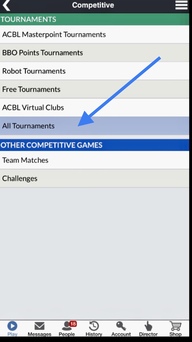
click on "Competitive"


Under "TOURNAMENTS" 
click on "ALL Tournaments"
 
(new)


Scroll down to find "Railway Union(private)"

Or enter "railway" into the Search button

If you and Cbai125470 are "Friends" his name will light up in blue in the leftmost "Host" column, making the tournament easy to find.


There will be other clubs with host names Cbaixxxxx: check you have the right one. Only tournaments starting in the next two hours are shown.

Click on "Railway Union(private)", not on the Host (Cbai125470). 


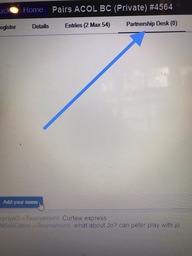
At the top of the next screen click on "Partnership Desk" 


DO NOT USE ANY WAY OTHER THAN "PARTNERSHIP DESK" TO JOIN AN RU TOURNAMENT. Just trust us! 

If your partner has already added his name at the the Partnership Desk, click on your partner's name. 


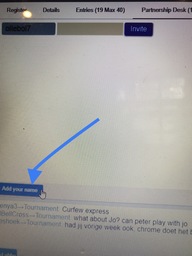
Otherwise "Add your name".


When your arranged partner comes to the Partnership Desk he will click on your name to join up. If you have not arranged a partner others will see your name and can click on your name to suggest to play together.

You need to be online on BBO and in the "Competitive" area (new) to join up with a partner. 

If BBO asks you something about "changing your cc to SAYC" just ignore it and click "OK". 

When someone clicks on your name to propose to play together you will receive a message on a pop up screen; click YES to accept or NO to decline (if waiting for a specific partner). N.B. both you and your partner need to be online and in the "Competitive"area at the same time to join up for the tournament. 

Once a pair have joined up their names will disappear from the Partnership Desk and will appear on the "Entries" list in the "holding area"  (the equivalent of the parade ring before a horserace where punters size up the competition). Relax until start time, but be online in the Competitive area well before start time (many tournaments start at the same time, BBO gets overloaded: if one of you is not online at the start time both names are removed automatically by BBO)

   
You need to be logged on to BBO, in the Competitive area, and at your keyboard at the start time. If not, you will be removed by BBO. 

BBO will log you off if it sees no keyboard/mouse activity for a few minutes, but it warns you first. 

If you are on BBO, in the Competitive area, at the start time, you will be whisked off to your bridge table where you will meet your friendly Railway members.


New from 16th May 2020:

To cope with Covid-driven demand BBO has divided itself into "Casual" and "Competitive" areas. People in one area are invisible to those in the other area. At the start time of a tourney, if you are offline, or online in the "Casual" area, you will be dropped from the tourney by BBO. To avoid being dropped by BBO: be online in the "Competitive" area (e.g. in the "holding area" looking at the list of entries, the equivalent of the parade ring before a horserace), before start time. 

There are shortcut ways to find the correct tourney. For now we are giving the most foolproof method rather than the quickest. If you know the shortcuts please don't confuse people by broadcasting them for the moment. 

To Chat on BBO

Use the "Chat" function at the bottom of your screen, select '"Table" to type your greeting to your partner and new opponents.

Commonly used abbreviations:

glp = good luck partner

typ = thank you partner

wpo = well played opponents

hlo = hard luck opponents           

This video might help             https://www.youtube.com/watch?v=UQNH99Ksrrs


ALERTING ON BBO

Unfortunately bids are alerted differently on BBO from in real bridge. Each bidder alerts his own bid (his partner will not see the alert, only the opponents). Make the bid then click on the bid and type the explanation (e.g. transfer), or select the bid and type the explanation before "making" the bid, whichever works for you. Do not tell the table what the bid means....that woud be talking to your partner! 

To enquire what an opponent's bid means, click on the bid. The bidder will type the explanation, again invisible to the partner of the bidder.  

There is no stop card on BBO. Yes this is diferent from real bridge...we will have to revert to "proper" practices when real bridge resumes! 

UNDOs

It is easy to click on the wrong card or bid (a "misclick"); if this happens click on "Undo" immediately (the sooner the better), opps can accept or decline to grant the undo. For now we are requesting members to grant ALL undos, during bidding or play. Even if the undo has been requested in error, it wastes less time to grant it than to explain why it is not necessary. 

This is a helpful video on UNDOs and Alerts       https://www.youtube.com/watch?v=Fd9KLhFWlGU

Most Important Enjoy Your Game!

See you all in cyberspace soon.


RU BBO Tournament WhatsApp group

This where you will find notices of tournament times, updates on BBO changes, and advice on using BBO for the first time. Trust us, it helps a lot when getting started! Only committee members post to this group. 


RU VIRTUAL BAR WhatsApp group

The RU Virtual Bar WhatsApp group is where you can look for a partner, ask for advice on using BBO, drop in to discuss hands, chat and relax after a tournament with your RU friends - but it's BYOB! Hope to see you there. 

To look for a partner on the RU BBO VIRTUAL BAR Whatsapp group:

Post "John Smith is looking for a partner for Monday" to the group. To take up his offer, send a Whatsapp message to John privately; once fixed up John posts '"John Smith now fixed up" to the group. 

To be addded to the RU BBO tournament Whatsapp group email: railwayunionbridge@gmail.com         

10 Year Anniversary Book

10 Year Anniversary Book 

In 2021, to mark its 10 year Anniversary, Railway Union Bridge Club produced a souvenir book recording the Bridge Club's journey over its first 10 years. The book was presented to all members as part of the 10 year celebrations, with many familiar faces and friends throughout it - with lots still playing in the club today.

See the book here

We hope you enjoy it!