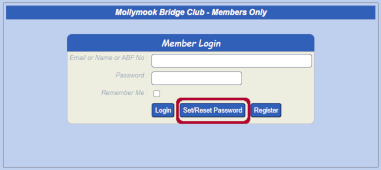
Setting Up Your Password
Follow these steps to set up your login password:
1. Press the Members Only Button (Home Page top right)
2. Do not fill anything in on this next screen – simply press the 'Set/Reset Password'
3. In the next screen enter your email address (If you and your partner use the same email address put your ABF Number in here). Click 'Send Set Password Email'
4. Check your emails for an email to arrive and follow the prompts. It will get you to click on a link, enter a password and re-type the password
Please note: Passwords must be between 6 and 20 characters in length and may ONLY include the following characters: A-Z a-z 0-9 and the special characters - _ . % : $ (dash, underscore, full stop, percent sign, colon and dollar sign)
5. If you don't receive an email in 5-10 minutes, check your junk, spam, promotions folders. If you find it there, mark as not spam so that you can receive further emails from Macedon Ranges Bridge Club
6. If you continue to have difficulties setting up your password, contact Guy McCallum
|